Information Architecture

Service Design

Luxe Bidet FAQ Redesign

Redesigning self-service support through clearer information architecture

Client

Luxe Bidet

Duration

4 weeks

Tools

Figma, Google Sheets, Google Docs

My Role

UX Designer: UX audit, information architecture redesign, user flows, low to mid fidelity prototyping, usability testing, iteration

Challenge

Customers frequently contacted support for issues that already had answers in the FAQ, often related to installation errors, leaks, or part compatibility. The problem was not lack of content, but poor navigability and unclear structure, which increased cognitive load and discouraged self-service.

oPportunity

Redesign the FAQ to align with how users think about problems rather than product models, enabling faster self-service while preserving access to human support when needed.
Information Architecture

Service Design

Luxe Bidet FAQ Redesign

Redesigning self-service support through clearer information architecture

Client

Luxe Bidet

Duration

4 weeks

Tools

Figma, Google Sheets, Google Docs

My Role

UX Designer: UX audit, information architecture redesign, user flows, low to mid fidelity prototyping, usability testing, iteration

Challenge

Customers frequently contacted support for issues that already had answers in the FAQ, often related to installation errors, leaks, or part compatibility. The problem was not lack of content, but poor navigability and unclear structure, which increased cognitive load and discouraged self-service.

oPportunity

Redesign the FAQ to align with how users think about problems rather than product models, enabling faster self-service while preserving access to human support when needed.
Information Architecture

Service Design

Luxe Bidet FAQ Redesign

Redesigning self-service support through clearer information architecture

Client

Luxe Bidet

Duration

4 weeks

Tools

Figma, Figjam

My Role

UX Designer: UX audit, information architecture redesign, user flows, low to mid fidelity prototyping, usability testing, iteration

Challenge

Customers frequently contacted support for issues that already had answers in the FAQ, often related to installation errors, leaks, or part compatibility. The problem was not lack of content, but poor navigability and unclear structure, which increased cognitive load and discouraged self-service.

oPportunity

Redesign the FAQ to align with how users think about problems rather than product models, enabling faster self-service while preserving access to human support when needed.
Outcome

The redesigned FAQ reduced navigation complexity, clarified problem pathways, and supported both fast task completion and exploratory learning. Usability testing confirmed improved confidence and efficiency in finding answers, validating the new information architecture.

Stage 1: Problem Exploration

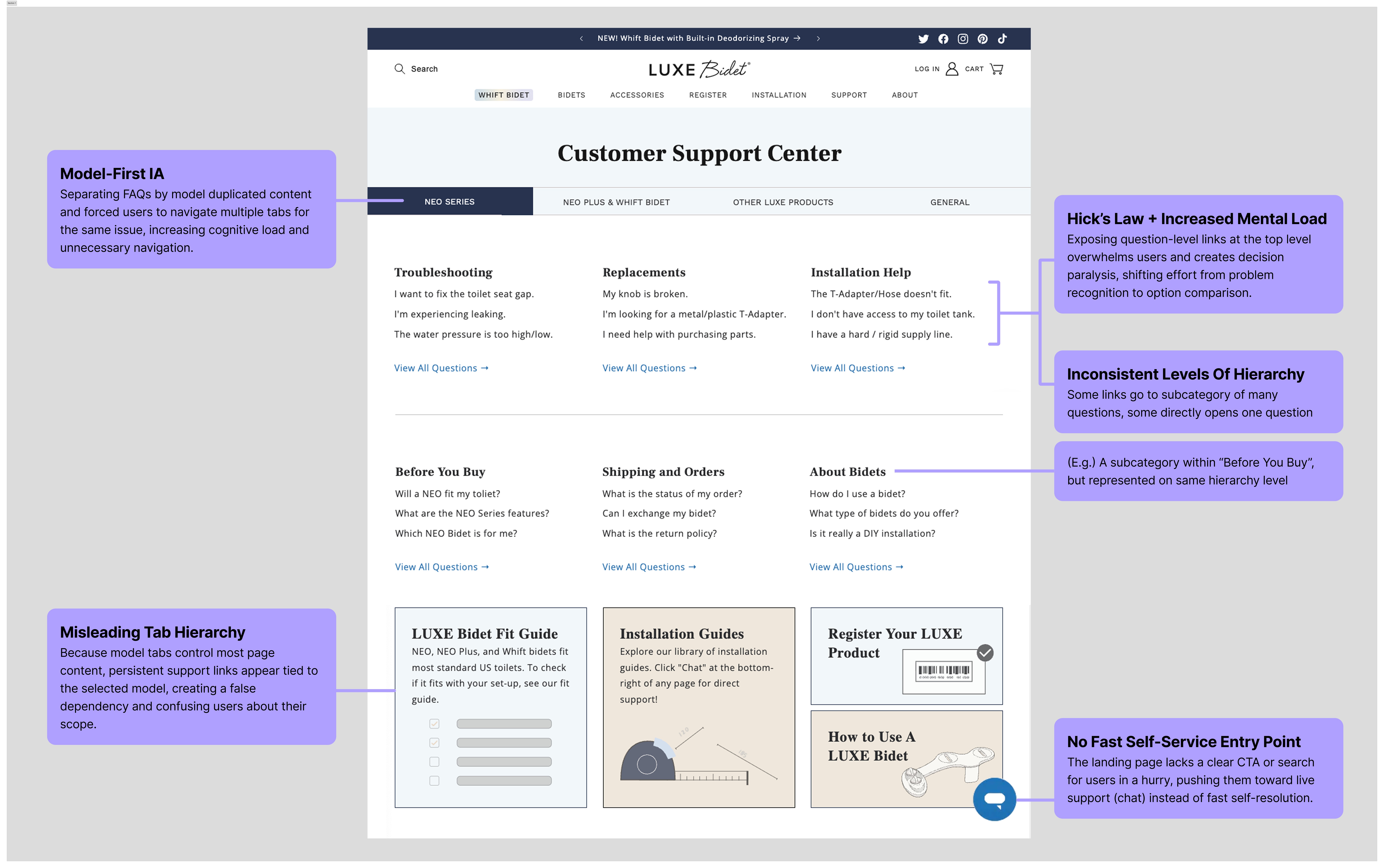
UX Audit of Current FAQ Page

UX Audit

I conducted a structural audit of the FAQ, mapping navigation depth and interaction paths to identify breakdowns. Key issues included:

  • Inconsistent hierarchy where some links jumped multiple levels

  • Categories that functioned as subcategories, creating false mental models

  • Duplicate questions across product models, especially Neo and Neo Plus

  • Question-level links surfaced too early, increasing selection paralysis

  • Support links buried under product tabs, discouraging self-service first

User personas

Task-driven users short on time who want immediate answers

Exploratory users willing to browse categories for understanding

The system failed both groups by neither supporting fast search nor progressive narrowing.

Problem Statement

How might we restructure the FAQ so customers can quickly identify their problem, find the right troubleshooting guidance, and resolve issues without unnecessary reliance on customer support?

Stage 2: Design Solution

To address these issues, I restructured the FAQ around problem-first navigation, reducing duplication across models and aligning the structure with how users describe issues in their own words.

To address these issues, I restructured the FAQ around problem-first navigation, reducing duplication across models and aligning the structure with how users describe issues in their own words.

The FAQ was reorganized into six high-level categories:

  • Troubleshooting

  • Missing & Broken Parts

  • Setting Up

  • Product Info & Compatibility

  • Other LUXE Products

  • Orders & Programs

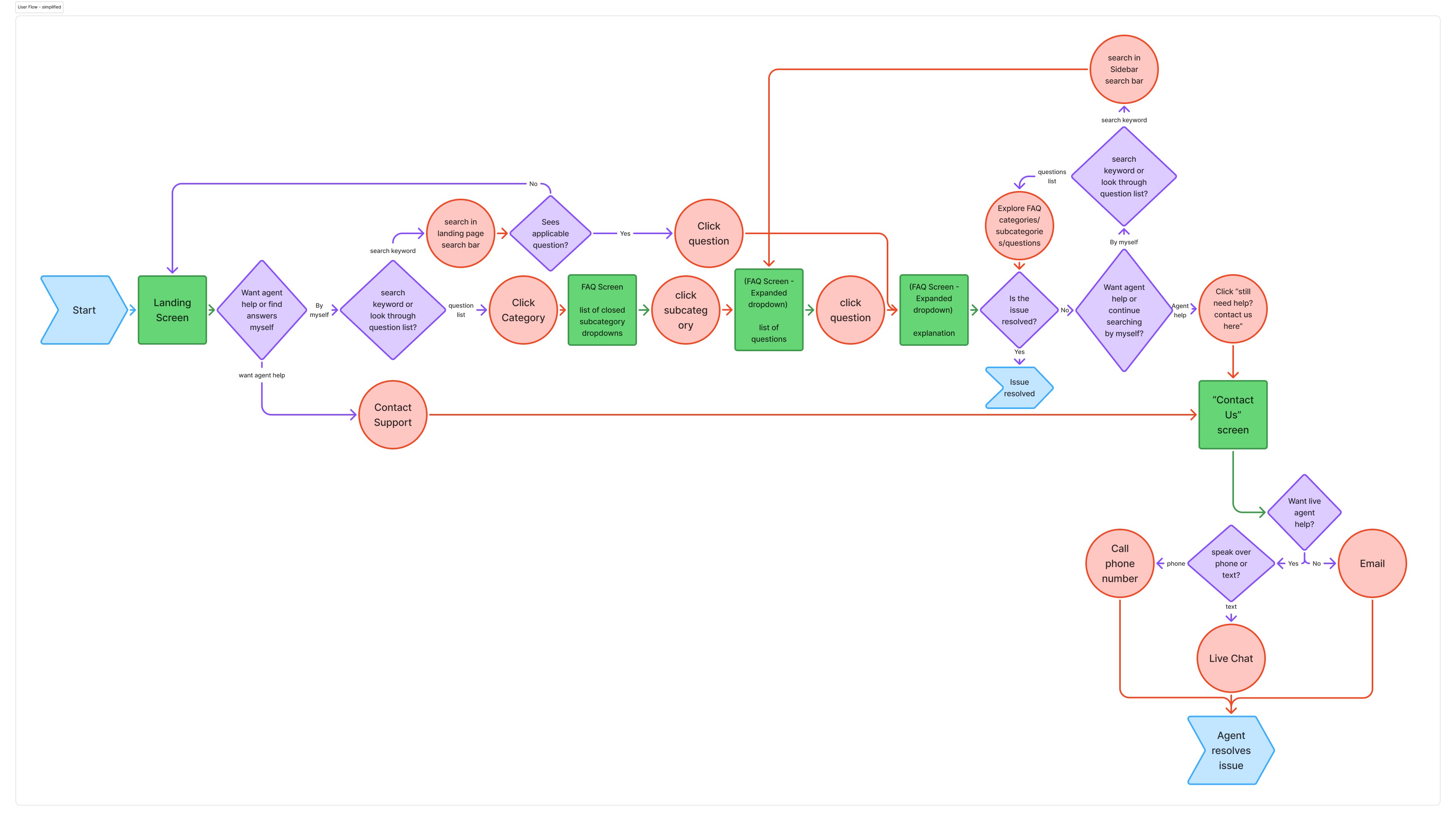
user flow

The new flow prioritizes search and problem-based discovery, with support options intentionally placed after self-service attempts rather than as the primary call to action.

Proposed FAQ User Flow

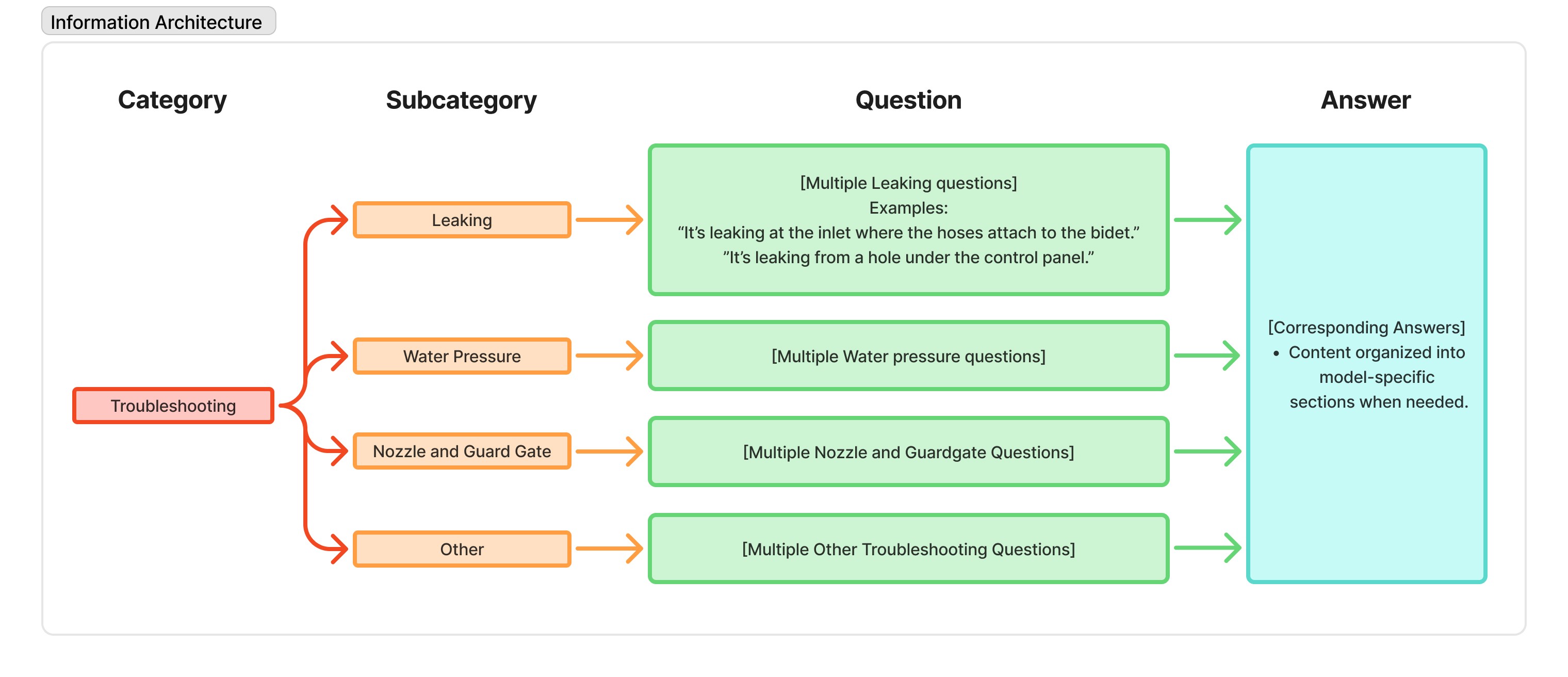
information architecture

To ensure consistency and clarity, each category follows a standardized hierarchy:
Category → Subcategory → Question → Answer, with answers consolidated and split into model-specific sections only when necessary.

The diagram below expands one representative category to illustrate how the system scales without overwhelming users at the top level.

Proposed Information Architecture (Example Category)

Stage 3: Prototyping and Iteration

Round 1 Findings

3 participants with mixed familiarity tested early prototypes.

3/3

participants misinterpreted at least one category label and clicked into the wrong section before correcting course.

2/3

participants expected “Replacements” and “Orders” to lead directly to customer support rather than self-service content.

3/3

participants needed guidance to return from a category page to the main FAQ.

iterations

  • Renamed categories to better match user expectations

  • Reworked copy to reduce reliance on descriptions

  • Moved contact options to the bottom of pages and added them under search

  • Introduced visual references for part identification

  • Simplified navigation by replacing breadcrumbs with back actions

Round 2 findings

6 participants with mixed familiarity. 3 (moderate product knowledge) + 3 (no product knowledge)

5/6

participants successfully navigated to the correct category on first attempt.

3/6

participants relied on first for targeted questions; all users completed tasks without assistance.

6/6

participants found “Contact Us” without prompting after attempting self-service.

Overall usability rating average:

8.3/10

Post-testing refinements

After Round 2, we made targeted refinements informed by consistent patterns observed during testing. These changes focused on clarity and discoverability rather than structural shifts:

  • Added commonly asked questions to the FAQ landing page to support faster entry points.

  • Refined category subtitles to better reflect included subtopics.

  • Repositioned the part identification guide for higher in-context visibility.

  • Adjusted placement of Contact Us to reinforce self-service first, with support available as a fallback.

Stage 4: Limitations and Next Steps

Limitations


  • The redesign was tested through usability sessions, not live support metrics.

  • CMS and SEO constraints limited how much the structure could change.

  • User behavior insights came mainly from support interactions rather than large-scale analytics.

Potential SOlutions


  • Measure impact using support deflection rates and search data after launch.

  • Work with engineering to enable small CMS improvements for more flexible content.

  • Use support ticket trends to continuously refine categories and labels.

Next steps


  • Pilot the redesigned FAQ and track whether issues are resolved before reaching support.

  • Add more visual, step-by-step troubleshooting for common installation problems.

  • Iterate category naming and copy based on real usage and search behavior.